
3D Graphics API
A 3D graphics engine written for the sidbox hardware. It is a library that can be downloaded and used with a development of a game for the sidbox.
The 3D-Graphics Engine
 SIDbox 3D is a compact software-based 3D engine developed for the SIDbox.
It began as an experiment to see how far the STM32H743 could be pushed when rendering a complete 3D world in software. As the renderer became more capable, it was expanded into a reusable C library that games, demonstrations, and other SIDbox programs can use without having to create their own 3D engine from scratch.
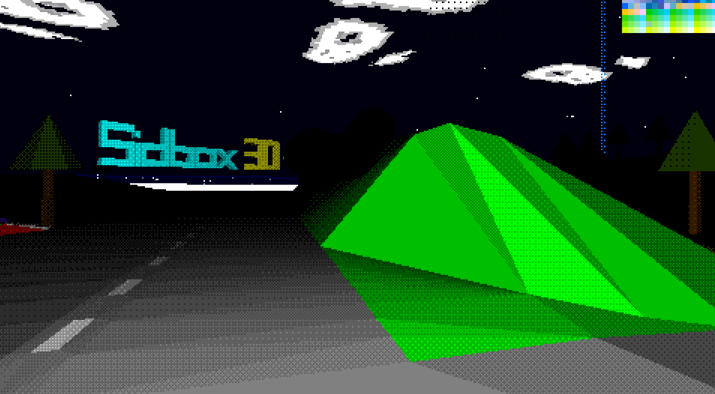
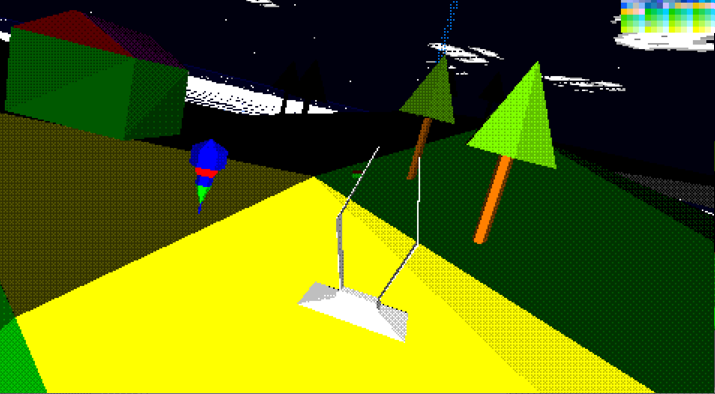
The library provides the core systems needed to build simple 3D worlds, including cameras, meshes, world entities, lighting, materials, collision detection, raycasting, particle effects, horizon rendering, and positional audio support.
SIDbox 3D is not intended to compete with modern desktop graphics engines. It is designed specifically for microcontroller hardware, where memory, processing time, and bandwidth must all be used carefully. Its aim is to provide a practical and flexible 3D system while retaining the distinctive appearance of early software-rendered games and simulators.
FROM DEMONSTRATION TO LIBRARY
The first version of SIDbox 3D was created as a rendering experiment. Its original purpose was simply to prove that the SIDbox could display and control a complete three-dimensional scene in real time.
As development continued, the renderer gained cameras, movable entities, lighting, clipping, collision detection, raycasting, particles, and other systems normally expected from a small game engine.
Rather than keeping these features locked inside a single demonstration, the engine was reorganised into the reusable sb3dlibrary.a static library.
SIDbox programs can link against this library and access the engine through a public C API. The application retains control of its own program structure, while SIDbox 3D provides the shared rendering, world-management, and mathematics systems underneath it.
This allows new games and demonstrations to use the same tested 3D foundation without rebuilding the entire engine for every project.
As development continued, the renderer gained cameras, movable entities, lighting, clipping, collision detection, raycasting, particles, and other systems normally expected from a small game engine.
Rather than keeping these features locked inside a single demonstration, the engine was reorganised into the reusable sb3dlibrary.a static library.
SIDbox programs can link against this library and access the engine through a public C API. The application retains control of its own program structure, while SIDbox 3D provides the shared rendering, world-management, and mathematics systems underneath it.
This allows new games and demonstrations to use the same tested 3D foundation without rebuilding the entire engine for every project.
HOW SIDBOX 3D WORKS
SIDbox 3D is divided between the reusable engine library and the low-level graphics functions provided by the SIDbox firmware.
The library handles the higher-level 3D systems, including cameras, meshes, entities, world transformations, clipping, lighting, collision detection, raycasting, and scene management.
Once the engine has transformed and prepared the visible geometry, the final triangles are passed to the SIDbox graphics system for drawing.
This separation keeps the library independent from any single game or demonstration. A program only needs to create its world, position its camera, update its entities, and ask the engine to render the scene.
The SIDbox firmware continues to handle the display, framebuffer, DMA2D graphics operations, audio, controls, and operating-system services underneath it.
By splitting the work in this way, SIDbox 3D remains reusable while still taking advantage of the hardware and firmware features already available on the system.
The library handles the higher-level 3D systems, including cameras, meshes, entities, world transformations, clipping, lighting, collision detection, raycasting, and scene management.
Once the engine has transformed and prepared the visible geometry, the final triangles are passed to the SIDbox graphics system for drawing.
This separation keeps the library independent from any single game or demonstration. A program only needs to create its world, position its camera, update its entities, and ask the engine to render the scene.
The SIDbox firmware continues to handle the display, framebuffer, DMA2D graphics operations, audio, controls, and operating-system services underneath it.
By splitting the work in this way, SIDbox 3D remains reusable while still taking advantage of the hardware and firmware features already available on the system.
BUILDING A 3D WORLD
A SIDbox 3D world is built from a small set of reusable components: cameras, meshes, and entities.
Meshes contain the shape of an object, including its vertices, triangles, and material information. A single mesh can be reused by multiple objects, helping to reduce memory usage.
Entities place those meshes into the world. Each entity can have its own position, rotation, movement, scale, lighting behaviour, and collision settings.
The camera determines the viewer’s position and direction. It can be moved and rotated freely, allowing the same engine to support flight games, driving games, first-person views, fixed cameras, or external tracking cameras.
During each frame, SIDbox 3D transforms the visible entities into camera space, clips geometry that falls outside the viewing area, prepares the remaining triangles, and sends them to the renderer.
This structure allows a game to build a complete 3D scene without needing to manage the underlying transformation and rendering mathematics directly.
Meshes contain the shape of an object, including its vertices, triangles, and material information. A single mesh can be reused by multiple objects, helping to reduce memory usage.
Entities place those meshes into the world. Each entity can have its own position, rotation, movement, scale, lighting behaviour, and collision settings.
The camera determines the viewer’s position and direction. It can be moved and rotated freely, allowing the same engine to support flight games, driving games, first-person views, fixed cameras, or external tracking cameras.
During each frame, SIDbox 3D transforms the visible entities into camera space, clips geometry that falls outside the viewing area, prepares the remaining triangles, and sends them to the renderer.
This structure allows a game to build a complete 3D scene without needing to manage the underlying transformation and rendering mathematics directly.
LIGHTING, MATERIALS AND VISUAL STYLE
SIDbox 3D includes a compact lighting and material system designed to add depth and shape to simple geometry without requiring textures or modern graphics hardware.
Meshes can use different material settings to control how their surfaces are rendered. Lighting can then be calculated from either point lights or directional lights, allowing objects to react to nearby light sources or a fixed source such as the sun.
The engine uses this lighting information to select the final colour and brightness of each visible surface.
SIDbox 3D can render objects using flat colours, simple shaded surfaces, or a two-shade dithered style. The dithered mode helps create the appearance of additional shading while retaining the distinctive look of early software-rendered games.
These systems are deliberately lightweight. They provide enough visual detail to make objects readable and give scenes a sense of depth, while remaining practical for the SIDbox’s microcontroller-based hardware.
Meshes can use different material settings to control how their surfaces are rendered. Lighting can then be calculated from either point lights or directional lights, allowing objects to react to nearby light sources or a fixed source such as the sun.
The engine uses this lighting information to select the final colour and brightness of each visible surface.
SIDbox 3D can render objects using flat colours, simple shaded surfaces, or a two-shade dithered style. The dithered mode helps create the appearance of additional shading while retaining the distinctive look of early software-rendered games.
These systems are deliberately lightweight. They provide enough visual detail to make objects readable and give scenes a sense of depth, while remaining practical for the SIDbox’s microcontroller-based hardware.
COLLISION DETECTION AND RAYCASTING
SIDbox 3D includes collision and raycasting systems that allow objects to interact with the world rather than simply passing through one another.
Entities can use sphere, box, or mesh-based collision detection depending on the level of accuracy required. Simpler collision shapes are faster to process, while mesh collision can be used where closer contact with the visible geometry is needed.
The engine also supports moving collision tests, allowing programs to check whether an entity can travel safely between two positions. This can be used for players, vehicles, projectiles, enemies, and other moving objects.
Raycasting allows a program to trace an invisible line through the 3D world and determine what it hits. Rays can be fired from any position or directly from the camera.
This makes raycasting useful for weapons, object selection, line-of-sight checks, distance measurements, interaction systems, and determining which object the player is looking at.
Together, these features allow SIDbox games to build worlds that respond to movement, contact, and player actions rather than acting as purely visual demonstrations.
Entities can use sphere, box, or mesh-based collision detection depending on the level of accuracy required. Simpler collision shapes are faster to process, while mesh collision can be used where closer contact with the visible geometry is needed.
The engine also supports moving collision tests, allowing programs to check whether an entity can travel safely between two positions. This can be used for players, vehicles, projectiles, enemies, and other moving objects.
Raycasting allows a program to trace an invisible line through the 3D world and determine what it hits. Rays can be fired from any position or directly from the camera.
This makes raycasting useful for weapons, object selection, line-of-sight checks, distance measurements, interaction systems, and determining which object the player is looking at.
Together, these features allow SIDbox games to build worlds that respond to movement, contact, and player actions rather than acting as purely visual demonstrations.
SIDBOX 3D DOCUMENTATION
This article provides an overview of SIDbox 3D and the systems available within the engine.
The complete SIDbox 3D documentation contains more detailed information about the library, including its cameras, meshes, entities, lighting, collision systems, raycasting, particles, horizon rendering, positional audio features, and public C API.
It also includes the functions and structures needed to begin creating SIDbox 3D programs.
View the complete SIDbox 3D documentation here.
Future development updates, demonstrations, and changes to the engine will be added to this project article as the library continues to evolve.
The complete SIDbox 3D documentation contains more detailed information about the library, including its cameras, meshes, entities, lighting, collision systems, raycasting, particles, horizon rendering, positional audio features, and public C API.
It also includes the functions and structures needed to begin creating SIDbox 3D programs.
View the complete SIDbox 3D documentation here.
Future development updates, demonstrations, and changes to the engine will be added to this project article as the library continues to evolve.
Comments 0
Comments are reviewed before they appear publicly.
Leave a Comment